Finding your way starts here.
Running with a map is simpler than it sounds. Learn the basics, then get out there.
Running with a map is simpler than it sounds. Learn the basics, then get out there.
Running with a map is simpler than it sounds. Learn the basics, then get out there.
Running with a map is simpler than it sounds. Learn the basics, then get out there.

Your map shows paths, water, forest, hills, and the course. Find the controls in order. How you move between them is your choice.
Your map shows paths, water, forest, hills, and the course. Find the controls in order. How you move between them is your choice.

Start
Begin navigation here.

Control point
Marked in the terrain with a flag. Find each control point in order.

Finish
Fastest time wins.
Colors show the type of terrain.

Open land
Fast and easy to run through.

Open forest
Forest you can usually move through well.

Dense forest
Slower to move through. Often better to go around.

Water
Lakes, ponds, streams, ditches, or wet areas.

Open land with scattered trees/bushes
Mostly open, but with trees or bushes in the terrain.

Cultivated land
Fields or planted areas. Do not enter.

Forbidden area
Typically private land. Do not enter.
Symbols show features on the map.


Dirt road


Path


Paved area


Building


Prominent man-made features


Pit, small depression


Knoll


Road


Stream


Passable fence


Uncrossable water


Railway


Wall


Major/small powerline


Small tower


Cliff


Ruin


Small/large marsh


Boulder


Boulder field
Road
Stream
Passable fence
Uncrossable water
Railway
Wall
Major/small powerline
Small tower
Cliff
Ruin
Small/large marsh
Boulder
Boulder field
Colors show the type of terrain.
Symbols show features on the map.
Open land
Fast and easy to run through.
Dirt road
Uncrossable water
Open forest
Forest you can usually move through well.
Path
Railway
Dense forest
Slower to move through. Often better to go around.
Paved area
Wall
Water
Lakes, ponds, streams, ditches, or wet areas.
Building
Major/small powerline
Open land with scattered trees/bushes
Mostly open, but with trees or bushes in the terrain.
Prominent man-made features
Small tower
Cultivated land
Fields or planted areas. Do not enter.
Pit, small depression
Cliff
Forbidden area
Typically private land. Do not enter.
Knoll
Ruin
Road
Small/large marsh
Stream
Boulder
Passable fence
Boulder field
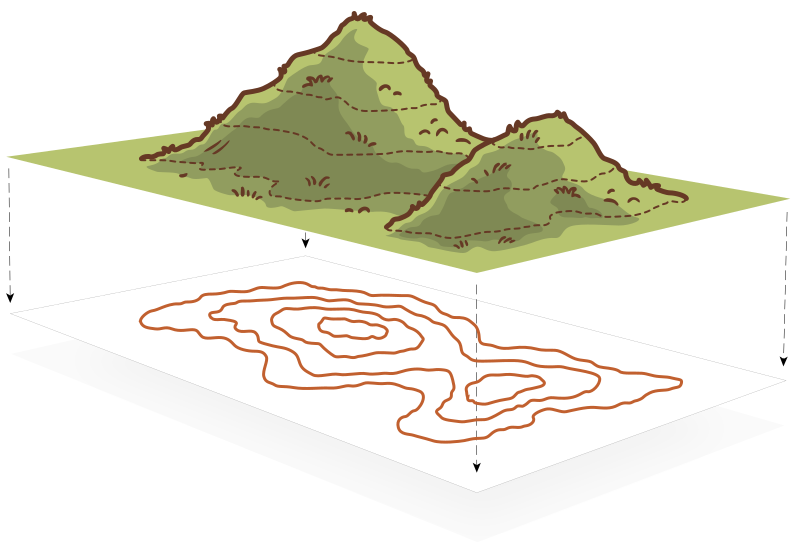
Brown lines show elevation. Imagine a mountain made of stacked pancakes. Each line is the shape of a pancake level.
Brown lines show elevation. Imagine a mountain made of stacked pancakes. Each line is the shape of a pancake level.
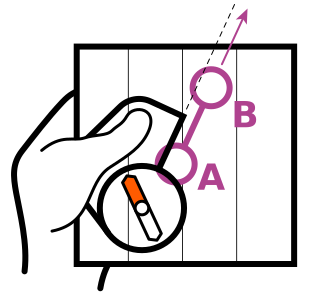
Place the compass edge from A to B.
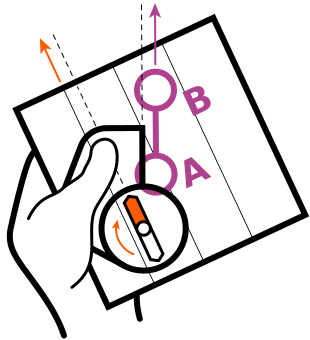
Turn your body until the needle matches the north lines.
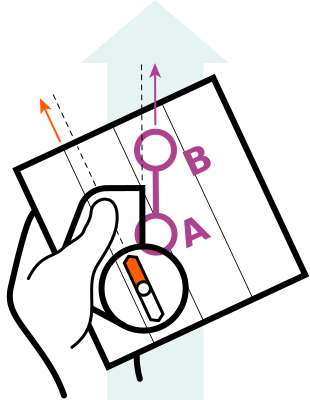
Move that way. Keep the needle lined up.
A map changes everything when you’re in the forest. Reserve your map and try it on your next run.
See events